Start Date
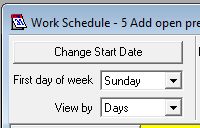
Clicking on Change Start Date (Fig. 1) opens the following selector box (Fig. 2) which allows you to both set and change the start date of a campaign.
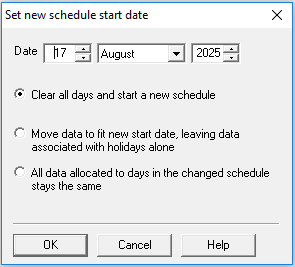
Fig. 2 - Set new schedule start date
If you have already allocated agent numbers and hours by time period, then changing the start date presents you with the options shown below.
 Clear all days and start a new schedule
The scheduler will change to show just the new start date (as entered in this box), with no data entered for it.
Move data to fit new start date, leaving data associated with holidays alone
Move forwards
All the days, for which data is entered, are moved forward in the sequence they appear, subject to holiday rules.
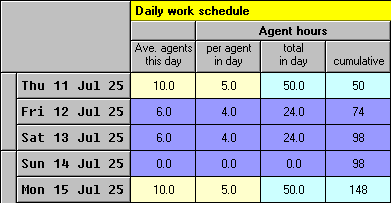
Here's a very short campaign with a before (Fig. 3) and after (Fig. 4 and Fig. 5) showing how it works.
To begin with, we have a start date of Thursday 11 July 2025, and three marked holidays (with a purple background), covering perhaps a bank holiday weekend.
After the start date has been advanced by two days, we have
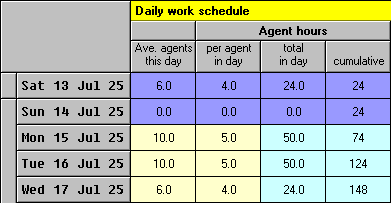
Data recorded for the holidays is left unchanged. Data is ignored, if as in the case of Friday, it occurs before the new start date. All the other data is simply moved forward and allocated to allowed days in sequence. So the data for the allowed days has been moved from Thurs to Mon and Mon to Tues. The data for Wednesday was not entered as part of the move, but is the balance of the campaign agents and hours, that Oceanic® has assigned subsequently to the next allowed day, to restore cumulative hours to the campaign total of 148.
Move backwards
All the data from working days is just moved back in sequence to absorb available working days. Any data recorded for holidays is left unchanged. The after picture we just looked at in Fig. 4 now changes to
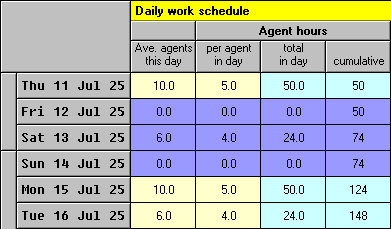
The Friday holiday is now ignored, and that other holiday data remains as before. So remember that if you set the start date back a long way, be sure to enter data in for any new holidays appearing in the scheduler that you want to do some work on. And note that all allowed days have been moved back in sequence.
All data allocated to days in the changed schedule stays the same
Move backwards
The new days available at the start of the campaign will be left empty for you to fill in. As you do this, remember that you may need to reduce the data you already entered in later days otherwise you'll overrun the agent hours available.