Introduction
This demonstration simulates the thinking of a call center manager, Polly Hunt at GTI Marketing.
The numbered examples (in the
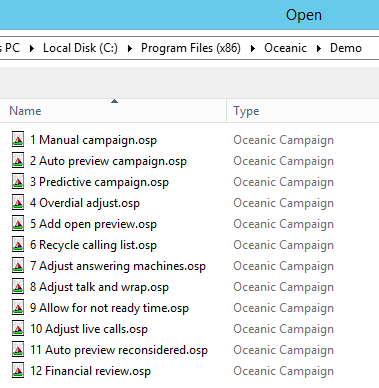
Fig. 1 - The Demonstration Example Campaigns
Open each one within Oceanic® as you follow the help topics. Don't be tempted to skip them, or you will miss what is going on.
 The background
This is a new posting for Polly, who is responsible for running up to six different campaigns at any one time. It's the biggest call center she has worked in, but surprisingly there is hardly any automation of workflows, and there are few standards in place for what the different teams should be doing. She has been hired as an agent of change.
She decides to begin by taking a typical campaign and making a plan as to how it should be run. The campaign calls for agents to renew home maintenance agreements that lapsed some months ago for The Home Handyman company. These cover heating and plumbing services.
Polly has the following objectives
- simulate the dialing and other conditions for the campaign
- select an appropriate dialing method
- achieve an 80% contact rate for the numbers in the calling list
- figure out the profitability for the campaign, and
- create a typical work schedule
The base data
Polly starts by assembling her base data as follows
| Description | Value |
|---|---|
| Trunks/ ports | No limits. (See Trunks/ Ports Usage for settings) |
| Size of calling list | 25,000 numbers |
| Number of agents | 20 |
| Results talk band | 10% of live calls, at average of 480 seconds |
| Reschedules talk band | 30% of live calls, at average of 35 seconds |
| No Results talk band |
60% of live calls, at average of 25 seconds Note
In the talk bands, Oceanic® allows up to three distributions for 'no results' to be shown. No Results here is just an average. If Polly had wanted to she could have used one talk band for short hangups, another for presentations that were declined and so on, each band with its own average talk time. |
| Not ready time | Zero |
| Call outcome breakdown: | |
| live calls | 35% |
| no answers | 30% |
| busies | 7% |
| other telco | 2% |
| answering machines | 25% |
| faxes and modems | 1% |
>> Next - 1) Evaluate Manual Dialing