Cycle 2
The table below maps out some example expectations for Cycle 2, given the outcomes of Cycle 1
| Cycle 1 - Call was a... |
Cycle 2 - We expect... (%) |
||||
|---|---|---|---|---|---|
| Talk | Reschedule | No answer | Busy | Totals | |
| Reschedule | 60 | 20 | 10 | 10 | 100 |
| No answer | 30 | 25 | 40 | 5 | 100 |
| Busy | 41 | 34 | 10 | 15 | 100 |
 Guidance on values
Reschedule
Guidance on values
Reschedule
When we called in Cycle 1, the person we wanted wasn't in, and we were advised to try back at another time, i.e. we made an appointment to call back. So the chance of talking to the right person next time is pretty good, and we have suggested a percentage likelihood of 60%. There is of course the chance that the right person is still not available, and we arrange to call back again at another time, which will be Cycle 3. And there is also the likelihood of a no answer or a busy.
No Answer
For calls which gave no answers in the first cycle, we can expect a quite different response pattern than for reschedules. The no answer rate is likely to be higher, perhaps significantly higher, and the talk percentage is almost certain to be lower.
Busy
The response patterns will be different again. Typically these numbers will be dialed again within minutes, in the hope that the line is free and that a live call will be achieved, so the proportion of talks and reschedules in Cycle 2 is likely to be high. Since, as in the case of no answers, we don't know whether the right party will be on the line, if we get a live call, the ratio of talks to reschedules is likely to be similar to that for the row for no answers, shown in the table.
Totals
By putting in percentages which add up to 100%, we are saying that in Cycle 2, we want to call all numbers with that outcome (e.g. reschedule) in Cycle 1. If we had wanted to recycle only half of these calls, then the percentages should add up to 50% only. We would expect them to be in the same proportion as shown above (e.g. for reschedules we would enter 30%, 10%, 5% and 5% respectively).
Values can be entered into Oceanic® as follows:
- At the bottom left of the Call Recycling Properties page, click on Add cycle. Row 2 appears in the Assumptions sections.
- Click on the first cell
- Enter a value (to 1 decimal place) between 0 and 100 (e.g. 60 from the above table)
- Click on the remaining cells in the row to enter the remaining values
As you enter numbers into these cells, the cells in the Outcomes section in the bottom half of the page will be updated immediately.
Reset cycle button
To zero all values in a row:
- select the row
- click the Reset cycle button
Clear all button
To remove any cycles except the initial cycle 1, click the Clear all button.
The row will then look like this (for example):
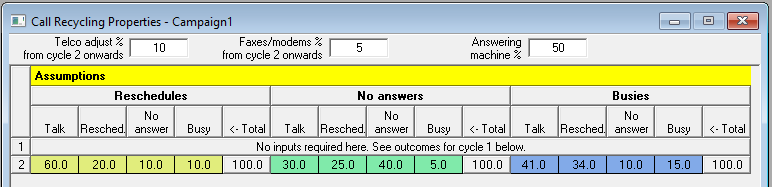
At this point, in the Outcomes section, you will probably see a difference between the cumulative call outcome totals for cycles 1 and 2, and your initial starting point, i.e. the call outcome properties now shown (in the Outcomes section) in the line for Cycle 1.
Once we have decided what proportion of calls from cycle 1 to recycle, (in this case 100% for each of our three input categories), we can either
- begin the simulation (by clicking the Start button), or
- select a further cycle(s). See Cycle 3 Onwards.