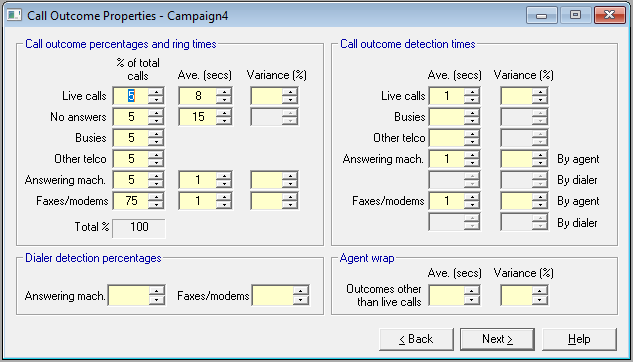
Fig. 1 - Call Outcome Properties
Take your time about the input requirements on this page (Fig. 1). There is a lot of them, and to avoid 'garbage in/ garbage out' it's worth making sure that you get all the data right. Later you may find that skipping some fields will save you time, and have no material impact on accuracy, but don't assume that until you know it. And the template facility should make this page easy to use, saving you having to re-key values that are common.
 Percentages of total calls
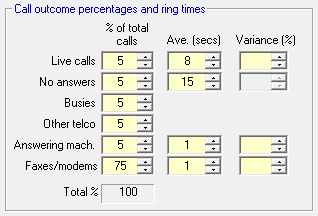
Fig. 2 - Call outcome percentages and ring times
Recording your expected call outcomes is a two stage process
- You begin on this page by recording your expectations for call outcomes in cycle 1 (Fig. 2), i.e. the first time you call everyone in the calling list
- Later in the Wizard, you can use the Call Recycling Properties page to rework the breakdown of outcomes, as a result of calling some numbers many times, and also to calculate the total number of calls that you will make
If you are experienced at planning outbound campaigns, you may be used to compressing these two stages into one, and therefore want to show a weighted average for all calls on this page. You can do this if you want to, but you will need to adjust the size of your calling list to allow for the fact that you are calling some numbers multiple times.
But even if you are an old hand, you should give call recycling a shot; you may be surprised at how it improves the accuracy of your calling.
Times - ring and detection
Fig. 3 - Call outcome percentages and ring times
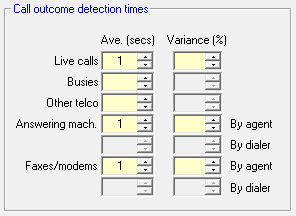
Fig. 4 - Call outcome detection times
These times are measured from the point that a dialer has made contact with the called number. See also dialing cycle. All call outcomes have either ring time (Fig. 2), detection times (Fig. 4) or both. In the case of machines, there is a choice of detection times. The possibilities are
| Call Outcome | Ring time | Detection time |
|---|---|---|
| Live Calls | Yes | Yes |
| No Answers | Yes | No |
| Busies | No | Yes |
| Other Telco | No | Yes |
| Answering Machines | Yes | Yes; up to two types in a campaign |
| Faxes and Modems | Yes | Yes; up to two types in a campaign |
In many cases the detection times will be small, mainly sub-second, and you may decide that in the interests of speed you can either omit some values, or use a template with standard values for your campaigns.
Dialer detection percentages
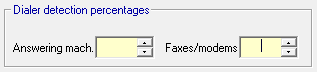
Fig. 5 - Dialer detection percentages
If your dialer is using special algorithms to decide whether a call outcome is an answering machine or a fax/ modem, then you should record its expected success rate here. See also Answering Machine Detection.
If you are using the Cookbook, Oceanic® assumes that dialer detection is possible in all agent dialing states except manual.
Agent wrap
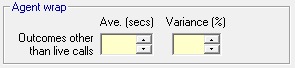
Fig. 6 - Agent Wrap for Non-Live Calls
You will recall from Setup and Talk Properties that when an agent finishes a live call, there is provision for a wrap period to follow immediately. Wrap may also be required for all other calls that get connected to the agent. The agent may spend a second or more detecting what kind of connect he has, and this will be recorded as detection time. Once the call has been terminated, the agent will probably want to make a note of what happened, and set a future action for that number. The time taken to do this is wrap time (Fig. 6), and is recorded on this page as a single average value, with a variance.
These two kinds of wrap times are amalgamated for reporting purposes. See Agent Summary.