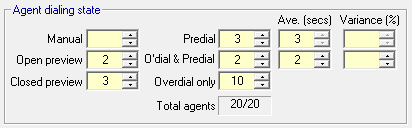
The purpose of this section is to allow you to assign preview, predial and overdial functions to the agents on your campaign.
If you are not sure at this stage what these terms mean, then you should jump to these topics and familiarize yourself with them briefly. Then proceed on the basis of the objective you have chosen.
Selection of some of these functions will be explicit by virtue of the dialing method you selected. For example, if you selected predictive dialing then you must assign an overdial function to at least some agents, but as yet you will not have taken a decision as to whether it will be applied to all or just some agents.
 Objectives: To determine either campaign length or size of calling list
Allocate the number of agents on the campaign across the enabled dialing states, ensuring that the sum of them agrees with the total shown in the shaded area, at the bottom of this section of the page (see Fig. 1 above), which is the number entered on the Campaign Properties page. Multiple states are available in five of the methods as follows:
| Predictive1 | Power1 | Progressive2 | Auto Preview3 | Cookbook4 | |
|---|---|---|---|---|---|
| Manual | Yes | ||||
| Open Preview | Yes | Yes | Yes | Yes | Yes |
| Closed Preview | Yes | Yes | |||
| Predial | Yes | Yes | |||
| Overdial and Predial | Yes | Yes | Yes | ||
| Overdial only | Yes | Yes | Yes |
Particular comments on dialing methods in the above table:
1Predictive and power dialing
Both predial groups are also overdial by definition
2Progressive dialing
Progressive dialing is essentially about predial, and Oceanic® allows some open preview as well
3Auto preview
Only two dialing states are shown enabled
4Cookbook
All dialing states are enabled
In all cases, you can start by allocating a number of open preview agents. In campaigns with lots of agents, you'll almost certainly want to make these kinds of calls and it is important not to leave them out.
You will also need to specify time data for any predial agents selected.
Objective: To determine number of agents required
If you have selected this objective and are using the Cookbook, on the Campaign Properties page, you will be able to select anysingledialing state from those available (Fig. 2) (i.e. Manual, Open preview, Closed preview, Predial, Overdial)
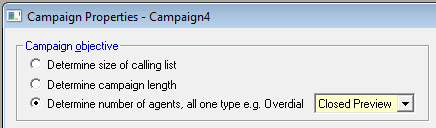
Fig. 2 - Number of Agents - Cookbook method
If you are using any of the other dialing methods, then the agent dialing state is implicit in the method (and this section will therefore be greyed out on this page). Both manual and simple preview campaigns will run in open preview mode; for the other four methods, you will notice a band of shaded question marks appear in one of the agent states on this page, indicating what kind of search Oceanic® is going to do.
If you want Oceanic® to find the right number of agents for a campaign with more than one dialing state, here's how to do it:
- Make sure that you are in Cookbook mode and select the objective for calculating the number of agents on the Campaign Properties page.
- On the same page, select the dialing state (see Fig. 2) that you expect most agents to be in and run the campaign. Make a note of how many agents Oceanic® says is required.
- Go to Campaign Objectives and change the objective to that of determining the campaign length, and insert the number of agents from the run you have just done.
- Allocate this number of agents across the agent dialing states you want in this Agent Dialing State section, and rerun the campaign.
- Compare the time taken on this run with your original objective. You should be very close. By pro-rating one time against the other, you should be able to calculate how many agents will be required. Especially if your agent numbers are low, don't be surprised if the figure is the same as that in the last run you did.
If you want to calculate the number of agents for power dialing, see Note in the topic on Power Dialing.