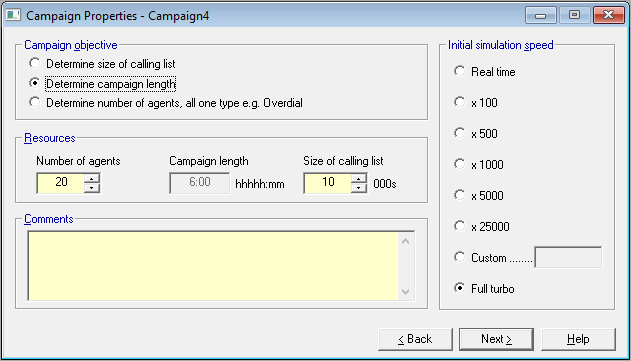
Oceanic® allows you to select one from three objectives (Fig. 1) when you run a campaign.
When you select one of these objectives, the data resource cell for that objective will be disabled, and you will then fill in the data resources cells that correspond to the other objectives. For example, if you want to determine campaign length you will need to specify the size of the calling list and the number of agents available.
| Objective | Input required | ||
|---|---|---|---|
| Number of agents | Campaign length | Size of calling list | |
| Determine size of calling list | x | x | |
| Determine campaign length | x | x | |
| Determine number of agents* | x | x | |
* Note that only one agent type is allowed. Selection is implicit in the method, unless you are in Cookbook mode, in which case you will need to make a choice.
 Limits for user input values
Campaign length
Limits for user input values
Campaign length
| Format | hours:minutes (hhhhh:mm) where
Use a colon, (:) to separate hours and minutes. Enter your data with no commas or other edit marks. |
| Min value | 1:00 (i.e. 1 hour) |
| Max value | 10000:00 (i.e. 10,000 hours) |
If you want to enter nine hours and seven minutes then enter as 9:7, or 9:07. When you tab away from the cell, Oceanic® will show it as 9:07.
If you show minutes in double figures (i.e. h:mm), then Oceanic® will check for valid values of mm between 00 and 59.
Size of calling list
(i.e. in cycle 1 as specified on this page)
Enter your data in thousands (000s), with no commas or other edit marks.
| Min value | Max value |
|---|---|
| 1
(i.e. 1000 records) |
10000
(i.e. 10,000,000 records) |
Number of agents
| Min value | Max value |
|---|---|
| 1 | 20 |
If you select the objective to calculate the number of agents required, and Oceanic® detects that more than 20 are required, you may be asked to either reduce the calling list size, increase the campaign length, or a combination of both (in fact we do allow you to overshoot a little occasionally, but don't plan for it).
If you are calculating either the campaign length, or the size of the calling list, and if the calculated figure, in either case exceeds the limit value you can specify on this page, Oceanic® will still allow you to run the campaign using it.
Minimum number of agents on a predictive campaign
The question is often asked as to the minimum number of agents that can be effectively deployed on a predictive campaign, and depending who you speak to the answer usually comes out anywhere from 5 to 15 agents, with the proviso that it really depends on the other campaign parameters. This answer is a fair approximation, but there is no substitute for feeding your assumptions into Oceanic® and deciding for yourself, based on talk and wait times, compared with other dialing methods. One conclusion that will surprise a lot of people, is that under some conditions, with a really efficient dialer, you can run a predictive campaign with four or five agents only, and get real performance improvements compared with say Auto Preview.
The conditions under which this happens are when the live call percentage is very low, and no answers and answering machines comprise a high proportion (in excess of say 70%) of call outcomes. The widespread use of answering machines in some territories, mean that these conditions occur more frequently than is supposed, and certainly more often than say just a couple of years ago. A crucial requirement is that the overdial algorithm in your dialer can adjust its dialing rate(s) appropriately to cope. At least some should be able to do so.
For more on this see Achieving the Set Target for Abandoned Calls.
Impact of objectives on call recycling
When you first use Oceanic®, you should consider the impact that call recycling will have on your objectives. In simple terms, expect the following
| Objective | Impact of increasing recycled calls |
|---|---|
| Determine size of calling list | Size will decrease |
| Determine campaign length | Time will increase |
| Determine number of agents | Number will increase |