Agent Summary
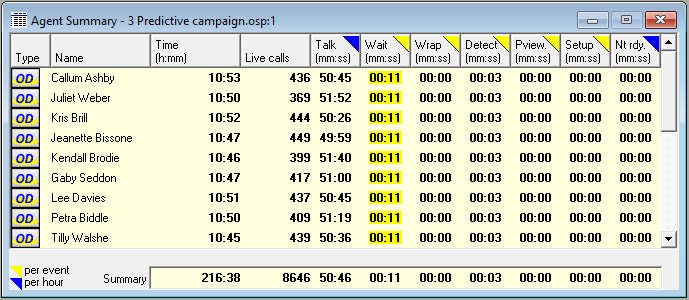
Fig. 1 - Agent Summary
This report summarizes all live call and time state information for agents, and can be shown/ hidden using the toggle button  in the top toolbar, or F9 on the keyboard.
The essence of it is that each time an agent finishes being in any kind of time state, Oceanic® measures the time and adds one to a counter, allowing it to compute both average time per hour in this state for each agent, and the average length of time in each state, per event, for each agent. See Explanation of columns - Time Toggle below.
 Explanation of columns
Type
Explanation of columns
Type
Each agent has a dialing state (type) which is either implicit in the dialing method you chose, or was assigned by you in Extended Properties These states are shown in the first column of the report, and will be one of the following:

|
Manual |

|
Open preview |

|
Closed preview |

|
Predial only |

|
Predial and overdial |

|
Overdial only |

|
Standby |
See Agent Dialing State and preview, predial, overdial and standby for a refresher on what these terms mean.
Time
This is time recorded since the agent logged in (in the form hh:mm)
Live Calls
This is the number of calls where contact has been made with a called party. For information on types of live calls, see Live Calls.
If your dialing method includes abandoned calls, you may notice, under some conditions, that the live call totals shown for call recycling outcomes are slightly lower than those shown on the Agent Summary, once a campaign has been run. This phenomenon derives from the difference in ring times assumed for live calls and machine call outcomes on the Call Outcome Properties page.
'Agent Time in State' columns
The remaining columns show the details for the different time states for all agents.
The reporting basis for each of these is straight forward. Click on the links for more information.
This records all the time that an agent spends waiting to receive another call, whether the call is live, or some other outcome.
The rise of answering machines in the proportion of call outcomes, and the unwillingness of many users to adopt answering machine detection, means that the proportion of time spent by agents terminating these and other machines is coming under close scrutiny, hence the decision to include time spent by agents on detection of these and other call outcomes, in this report. See also Answering Machine Detection
The open preview element of the setup times on the Setup and Talk Properties page has been isolated separately here. All other setup components are recorded under the Setup heading
All setup components other than open preview.
Call outcomes used in calculations
If you want to understand better which call outcomes are used in the calculations for these latter four columns, then see the following table.
| Agent Dialing State | Wait | Detect | Preview (open) | Setup |
|---|---|---|---|---|
| Manual | All calls except busies and other telcos | All call outcomes except live calls and no answers | All calls, if an open preview time specified, otherwise none. | Prep time and dialing setup time for all calls |
| Open preview | Live calls, no answers and machines connected to agents | All call outcomes except live calls, no answers and machines detected by the dialer | All calls | Dialing setup time for all calls |
| Closed preview | As above | All calls where machines are put through to agents | All calls to agents specified as open preview | Dialing setup time for all calls |
| Predial, Overdial, Overdial & Predial |
Live calls and machines connected to agents | As above | As above | N.A. |
Time Toggle - 

All times on the report are recorded in minutes and seconds. By clicking anywhere in each column you can toggle the reporting status (indicated by a coloured triangle in the header).
-
- the average amount of time spent in a state during an hour
-
- the average time an agent spends in this state, each time they enter it
For example:
- wait time is typically measured in average seconds between connected calls, so would normally be applied
- talk time is typically talked of in minutes per hour, so should be selected