Setup Times
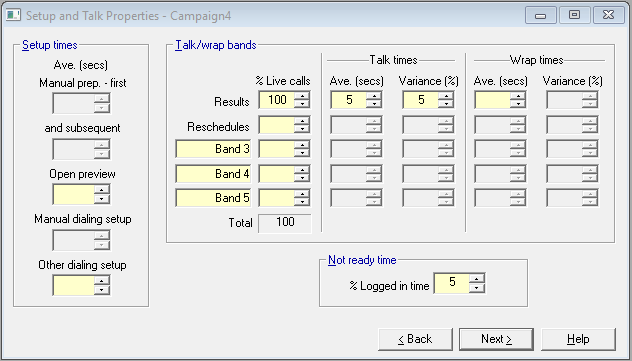
Fig. 1 - Setup and Talk Properties
For all dialing methods you should enter at least some setup times for calls on the Setup and Talk Properties page. The choices are
 Manual preparation - first
This applies to manual dialing only. The assumption is that the telephone number is going to be dialed by the agent, and this is the time taken to find the next number to dial.
Manual preparation - subsequent
This category also applies to manual dialing only. When the agent retries a telephone number that he has already dialed in the campaign, he may spend less time finding the right number to dial again, and this gives you the opportunity to put in a lower time for such retries.
Open preview
This state allows an unlimited amount of time to preview the called party's details before dialing is initiated. It is a natural state for preview dialing. Any dialing method may include agents to whom this state applies.
For methods other than open preview, if you are planning to allocate some agents to preview dialing later in the Wizard, don't forget to specify a time here.
Dialing Setup - manual/ other
We have combined two dialing elements in each of the two dialing setup controls - the dialing setup time itself, and the network time. See the dialing cycle for details of what these mean.
Unless you are using the Cookbook, only one of the two dialing setup controls will be available.
If you are using the Cookbook, the other dialing setup control will be a weighted average for all agents except manual ones.
We have omitted variances for these events since they have no statistical significance.