Agent Login Options
Two choices are provided to add a touch of realism to the calculations. From the Options menu, select Agent Login Method (Fig. 1).
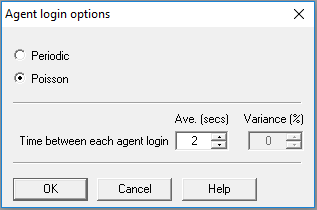
 1) Poisson
The Poisson distribution determines the number of agents expected to log in, in successive time intervals of equal value, when the mean number of agents expected in any time interval is 1.
Example
- Agents = 10
- Time interval = 4 seconds
- Average login period is 40 seconds, made up of 10 time intervals of 4 seconds each
The Poisson distribution returns a sequence of agent login values for the 10 successive time intervals, say as follows - 1,0,1,1,0,3,0,0,2,1,
In this case, only 9 agents have been logged in, in the average login period so Oceanic® will apply the Poisson distribution in further time intervals until all agents have been logged in
Once the number of agents for any time interval is determined, the login basis for them during that interval, is random. The allowable range of values for the time interval is 1 to 5 seconds.
The default setting in Oceanic® is Poisson, with a mean time interval of 2 seconds.
2) Periodic
Example
Taking the data from 1. above, all 10 agents would be logged in at 36 (not 40!) seconds from the start of the shift, that is at time intervals 0 secs, 4 secs.......to 36 secs. The allowable range of values for the time interval is 1 to 5 seconds. The default setting in Oceanic® is again a mean time interval of 2 seconds. You may apply a variance to it if you wish.
Impact on work scheduling
If you choose login intervals of close to 10 seconds, and especially if agent numbers are high, you should consider the possible impact on your work scheduling. See Work Scheduler -Agent Number Effects
This is a local option meaning that the value you select will be stored with your campaign when you save it, and then applied next time you open and run it.