Local and Global Settings
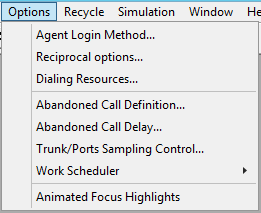
Fig. 1 - Local and Global Settings
The first two bands of items on the Options menu (Fig. 1) are local and global settings respectively for campaigns.
 Local settings
- Agent Login Method... - see Agent Login Options
- Reciprocal options... - see Reciprocal for Power Dialing
- Dialing Resources... - see Limits On Dialing Resources
Oceanic® provides defaults for the three items shown, and these will always be used, unless you decide to override them. If you do put in your own values, then they will be stored with your campaigns, when you save them, and then applied next time you run them. So, for example, if you don't change the setting for login, every campaign will use the Poisson Distribution method, with a mean time of one second.
Global settings
- Abandoned Call Definition... - see Measuring Abandoned Calls
- Abandoned Call Delay... - see Dialing Rules
- Trunk/ Ports Sampling Control... - see Trunks/ Ports Usage
- Work Scheduler - see Allowed Days and Holidays
The value of these settings is always applied to active campaigns, and is not stored when you save campaigns. So, for example, if you choose Option A for abandoned calls when you first load Oceanic®, this will be applied to all campaigns you run in the future, until such time as you change it.