The Work Scheduler option on the Options menu lets you screen out days that you don't want to work on, so that when you schedule agent hours, by whatever time period, these days are ignored as standard. This is a setting that will apply to all campaigns you run. Here's how it works:
 Allowed Days of the Week...
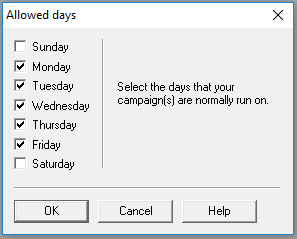
You start by selecting the days of the week that are normal working days, perhaps Monday through Friday, but any combination is selectable. If you sometimes work on a Saturday, but say only one in four, then you may leave it unselected here, which means it will be treated as a holiday. You can then enter data for every fourth Saturday if you wish, overriding the holiday status on an exception basis. See below.
Holidays...
Holidays are of two types:
- days of the week which have not been selected by you as allowed days, for example Sunday
-
specific dates in the year which may be either recurring or non-recurring, e.g.
- recurring - the 25th December is likely to be a recurring holiday, in which case you should enable the Repeat every year box, and the entry will be flagged yellow.
- non-recurring - if you observe a holiday on Good Friday, since this date will change from year to year, you should enter a separate date for each year. Non repeating dates like this will be flagged blue.
And, compared with allowed days, holidays have four distinguishing features:
- They are marked with a blue background for the length of the row
- You can always enter data for any holiday, but in day view only
- When you move a start date forwards or backwards, no change is made to any holidays in the changed schedule
- When you use the week view or month view to propagate data inputs, holidays will always be ignored
These are global settings and will apply to all campaigns you run, unless you change them by going to the Options menu.