Limits On Dialing Resources
Dialing resources in Oceanic® comprise trunk lines and ports. The default state for the availability of both these resources is one of no limits. But if you expect to be short of either resource, then you can restrict their usage by selecting Dialing Resources on the Options menu (Fig. 1).
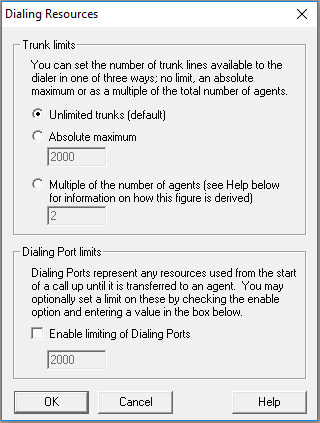
This is a local setting, and so if you want to do this, you will need to do so each time you open a new campaign.
 Trunk limits
The default value is Unlimited trunks. Otherwise, limits you may set are:
- Absolute maximum
Specify a number of trunks that may not be exceeded in running a campaign. This number may not be lower than one trunk for each agent logged in. If you do set a lower figure, Oceanic® will reset it to the number of agents at runtime. - Multiple of the number of agents
The multiple is applied to all power or predictive agents, with a figure of one trunk only being assumed for all other agent types logged in. See the example below, showing how the total number of trunks is worked out when the multiple is 1.4, and the campaign has a mix of predictive and open preview agent types.Agent types Agents Trunks Predictive agents 18 18 x 1.4 = 25.2 Open preview agents 5 5 Total agents and trunks 23 Total trunks available to campaign = 30
Dialing Port Limits
Either specify a number setting a maximum for port availability, or the default will be unlimited ports. The minimum number of ports is 1.
Assessing the impact of restrictions
If you want to examine the impact of restricting the number of trunks or ports available to a campaign, here's what to do:
- Start by having no limit
- Take a note from the Trunks/ Ports Usage graph of how many trunks and/ or ports are used
- Then gradually reduce the number of trunks and/ or ports available, and look at the impact on both agent states and also talk and wait times in the Agent Summary.
Note
If you apply limits to dialing resources on a predictive campaign or when using the Cookbook, Oceanic® will disable any settings for overdialing and run the campaign at a maximum overdial rate of 100%.