
Fig. 1 - Schedule Table Columns
The first 2 columns in the Schedule table - average agents and agent hours per agent - are inputs (i.e. for you to enter values);
 Input columns
Average agents
Input columns
Average agents
Enter the average number of agents logged in to a campaign during this period.
Although Oceanic® does its calculations on the assumption of a fixed number of agents, in practice the numbers you allocate may vary. See Agent Number Effects.
Agent hours
- Per agent - Enter the average number of hours each agent is going to work during this time period.
Allocation Controls
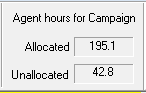
As you fill in the agent hours you want to allocate to particular time periods, the allocation controls in the top right of the Scheduler enable you to keep track of your progress.
Each time you run a campaign, you will find that the actual agent hours computed is subject to change slightly, because we are dealing in probabilities, not certainties. So checking these controls will tell you if you have to allocate additional hours, since the last run.
Oceanic® allows you to enter extra hours, beyond those available for allocation, but ignores them when completing the result, revenue and cost cells.
Once you have entered in these numbers for a campaign, you can then view the resulting outputs (i.e. calculated cells), in any time period form, even if it is different from the one used to create the schedule in the first place.
Output columns
Agent hours (cont)
- Total - multiplies agent hours per agent by average agents for this period, to give total agent hours logged in during this time period.
- Cumulative - accumulates total agent hours for this and all preceding time periods in the campaign.
Results
- In day/ week/ month - the number of results achieved for the agent hours in this time period. Oceanic® applies this information in the order displayed on the Call Recycling Properties page.
- Cumulative - cumulative results as a number.
- Cumulative % - cumulative results as a percentage of the numbers in the calling list for the campaign.
Financial summary
These columns combine the revenue and cost figures you entered at the top of the report (see Fig. 3) with the projected commitments to give a financial profile for each time period.
The Scheduler offers the same financial input controls as in the Forecast by Cycle report:
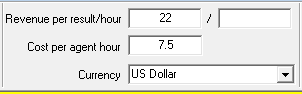
For more details, see Revenues and Costs.