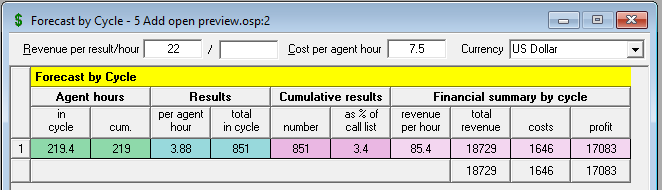
This report summarizes campaign results by cycle (Fig. 1), in terms of both commitments and also in financial terms, and can be shown/ hidden using the toggle button  in the top toolbar, or F11 on the keyboard.
First, in the top line, it requires you to make assumptions about revenues and costs. If you have already input this data into the Work Scheduler, then you will find it automatically repeated here. See Revenues and Costs for details.
A description of each column of the output table follows:
 Agent hours
Figures in the first column ('in cycle') show the number of logged in agent hours required to complete all the calls shown for each cycle on the Call Recycling Properties page. It includes the not ready time you specified on the Setup and Talk Properties page as well.
The second column ('cum') totals the first column on a cumulative basis; for example, a figure for cycle 3 represents the sum of agent hours required to make the calls in the first three cycles.
Results
The first column ('per agent hour') shows the number of results achieved per agent hour in a cycle. This is a good measuring stick to use for your campaign, to be sure that you are getting your assumptions in the right range.
The second column ( 'total in cycle') multiplies the results per agent hour for a cycle by the agent hours in the cycle.
Cumulative results
The next two columns ('number' and 'as % of call list') accumulate the results over the campaign, up to a given cycle, by both number and percentage; the latter is a percentage of the size of the calling list that you either specified for the campaign, or which Oceanic® calculated for you in the Campaign Summary.
Financial summary by cycle
These columns combine the cost and revenue figures you entered on the report with the projected results to give a financial profile for each cycle.
- Revenue per hour =
- Revenue per hour (from the top line) PLUS
- Revenue per result (from the top line) MULTIPLIED BY the Results - per agent hour in that cycle.
- Total revenue = the Revenue per hour column for the cycle MULTIPLIED BY Agent hours - in cycle.
- Costs = Agent hours - in cycle MULTIPLIED BY Cost per agent hour (from the top line)
- Profit = Total revenue MINUS Costs for the cycle.
Tip
When you completed the Campaign Wizard the first couple of times, you probably spent quite a lot of time researching your call event times, so as to be accurate as possible, and you may have also done a number of 'What Ifs', to assess the upside and downside impacts, where you were not sure about the right data to use.
Apply the same philosophy to this report and the Work Scheduler. Often you simply won't know what results and revenues to expect on a campaign, and you will want to be sure that if your best expectations are not met, then you can still count on a bottom line profit. So be sure to run a number of 'What Ifs', varying not just the revenue and cost assumptions, but also the percentages you specified for Results on the Setup and Talk Properties page.