Campaign Summary
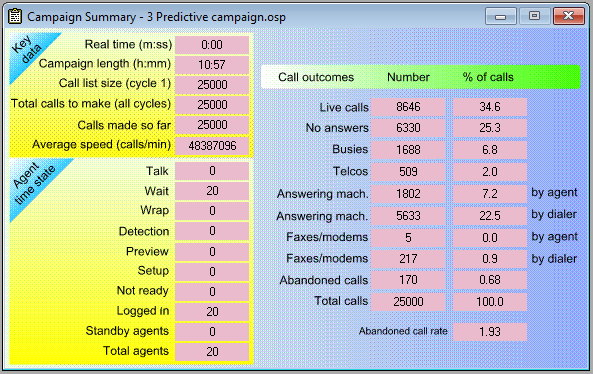
This report window is designed to give an overview of key campaign information, as it accumulates during a campaign run.
The window appears by default after clicking the Start button on the Call Recycling Properties page, and can be hidden/ shown using the toggle button  in the top toolbar, or F8 on the keyboard.
If you are running the demonstration, or have chosen an Initial simulation speed of Full turbo (on the Campaign Properties page), the campaign will have completed in less than a second. The metrics here will therefore be static, showing the values reached at the end of the campaign.
 Key data
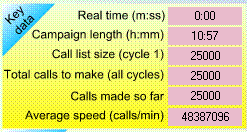
The Key Data section shows the current values for the following metrics:
Real time (m:ss)
Actual time in minutes and seconds from the time (by your watch) Oceanic® logged in the first agent for this campaign.
Campaign length (h:mm)
The time in hours and minutes, that would be required in real life, to allow the calls shown so far on the Campaign Summary to be made. From the time Oceanic® logged in the first agent for this campaign.
Call list size (cycle 1)
The size of the calling list in cycle 1. This may have been recorded by you on the Campaign Properties page; otherwise it is computed when a campaign has finished running.
Total calls to make (all cycles)
The size of the calling list in cycle 1, together with the recycled calls you specified on the Call Recycling Properties page in the Wizard
Calls made so far
Completed calls of all types, including any abandoned calls, at this point in the campaign
Average speed (calls/ min)
The average speed of Oceanic® per minute, for total calls of all types in the campaign to date.
Agent time state
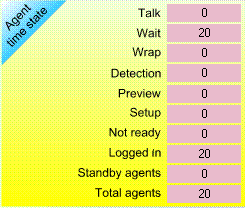
As an event-driven simulator, Oceanic® deals in several different kinds of states. Agents have two kinds of state;
- dialing states
- time states
The number of agents in each time state is updated dynamically as a campaign runs. The time states are
- Talk
- Wait
- Wrap
- Detection
- Preview
- Setup
For recording purposes this excludes open preview time, which is shown separately; see Preview above. It applies to manual dialing only, and to the use of dialing setup time in simple preview and auto preview - Not ready
- Logged in - the sum of all the above
- Standby - the total used in the campaign to date
- Total agents - the sum of the last two figures above
When a campaign finishes running, the time states for all agents are all zeroed, even though Oceanic® shows them still logged in.
Call outcomes
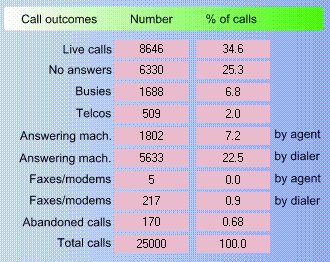
All this information mirrors the expectations that you generated in the Wizard and that was summarized in Call Recycling Outcomes.
Answering machines and faxes/ modems have been split according to how detection of them is done (by agent or by dialer).
The inclusion of any abandoned calls has the effect of depressing the percentages you supplied on the Call Outcome Properties page, so that all call outcomes including abandoned calls add up to 100%.
Abandoned call rate

This figure consists of two parts;
- abandoned calls as calculated by Oceanic® using the measurement option you selected, and
- any makeup calls