Manual to Simple Preview
The move from manual dialing to simple preview is quite a major step, since it means that instead of having your calling list scattered around you on bits of paper, in phone directories and so on, it's in a database format in your PC, where individual records or, more precisely, the next record for dialing can be easily accessed. Some simple preview systems will involve just a list of contact records containing telephone numbers, stored in a PC. Others will have highly sophisticated scripting systems. If you are thinking of running simple preview for a lot of agents, you should start by considering what agent involvement is required to get the contact information into the PC in the first place. If you are looking to the agent to do this, then you will need to allow for it.
An increasingly likely scenario is that you may have networked PCs, with a host server calling the shots as to what contact records are downloaded to a PC at the start of a shift, or the host server itself might be managing each agent's contact list centrally.
Telephony is likely to be handled using a card in the PC linked directly to the PSTN, but may also go through an ACD or switch. We have assumed in the examples that all call outcome detection in simple preview is done by the agent, but this won't always be the case.
As you make the change from manual to simple preview, things to be aware of in the Campaign Wizard are:
 Setup Times
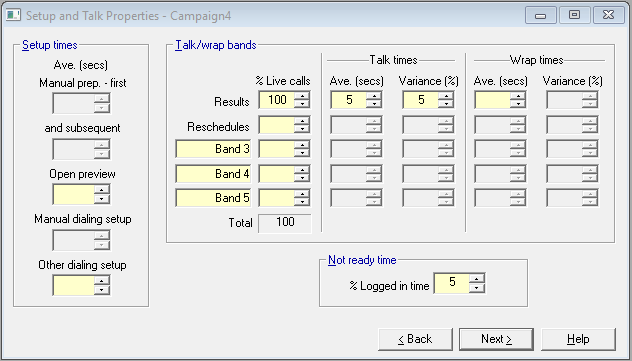
Fig. 1 - Setup and Talk Properties
Telephone numbers will now be dialed by a device attached to or in a PC, usually by the agent selecting an appropriate record, and clicking a phone icon. The time taken to find the next number to dial in the PC should be fairly small, so for simple preview, we are combining this time and the time taken to then select it and click the appropriate dialing icon, into the open preview time.
The only other cell now open in simple preview is dialing setup time, and you will probably want to adjust this downwards. Manual dialing will take as much as 10 seconds to punch out the digits and get through to the PSTN. What happens in simple preview will very much depend upon what modem or device you are using to do your dialing. Check it out with suppliers; better still test it out for yourself.
See also Setup and Talk Properties.
Talk Bands
Fig. 2 - Talk Bands
For points to consider here, refer back to the third paragraph in the topic in Upgrading Your System.
See also Setup and Talk Properties.
Call Outcome Properties
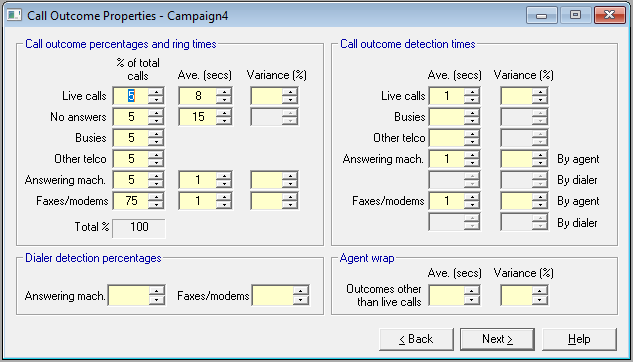
Fig. 3 - Call Outcome Properties
If you assume that dialer detection takes place, as opposed to all call outcomes being detected by the agent, then it's unlikely that the dialing device being used with the PC or an ACD, will be able to detect all call outcomes, and screen them from the agent.